EXPERT ADVISOR FOR METATRADER 5

Systematic trading.
Control in your hands.

From signals to trade management. MATS EA brings strategy,
automation, and risk controls into one system.

Multiple signals. Multiple timeframes. Your rules.

MATS EA / Trading workspaceILLUSTRATIVE INTERFACE
XAUUSD GOLD / US DOLLAR
M15HTF BIAS · BUY
Fast EMA Slow EMAKey Levels
BUY ZONE · HTFTREND CONSENSUS
08:0010:0012:0014:0016:00
ENTRY SIGNALSAND / OR
CHAIN MANAGEMENTDCA + ATR
RISK CONTROLSDaily TP / SL
08Entry signal sources
03Independent timeframes
04Trend presets + custom inputs
MT5Trading platform

ONE SYSTEM. MULTIPLE LAYERS OF CONFIRMATION.

Every decision.
Built on clear rules.

Connect market context with entry conditions and position management. You choose the rules. MATS EA follows your configuration.

01 / SIGNAL ENGINE

Signals working together.
A broader perspective.

Combine 8 Entry sources using AND or OR. AND requires matching directions; OR rejects conflicting BUY and SELL signals.

StochasticRSISupertrendCandleCHoCHStoch ReverseBollinger BandsSelf-Aware Trend
AND / OR ENTRY
02 / MULTI-TIMEFRAME

See the bigger picture.
Be selective with entries.

Separate Entry, Trend, and Higher Timeframes. Combine EMA, MACD, ADX, structure, VWAP, and Volume Profile.

HIGHER TIMEFRAMEContext & Key Levels
TREND TIMEFRAMEConfirm the trend
ENTRY TIMEFRAMEIdentify entry signals
03 / CHAIN MANAGEMENT

Manage each trade.
Track the whole chain.

DCA by price step or ATR. Choose multiplied, additive, or manual lot sizes; manage break-even and TP for each BUY/SELL chain.

Candle, Bias, and Lot Balance do not advance DCA progression.

04 / CONTEXT & EXECUTION

Read the structure.
Understand price zones.

Higher-timeframe bias with support, resistance, FVG, and liquidity. Separate analysis, signal filtering, and entries at Key Levels.

EXPLORE THE INTERFACE

The market in context.
Right on your chart.

Get to know the main areas of MATS EA on MetaTrader 5. Select a number on the image to read its explanation.

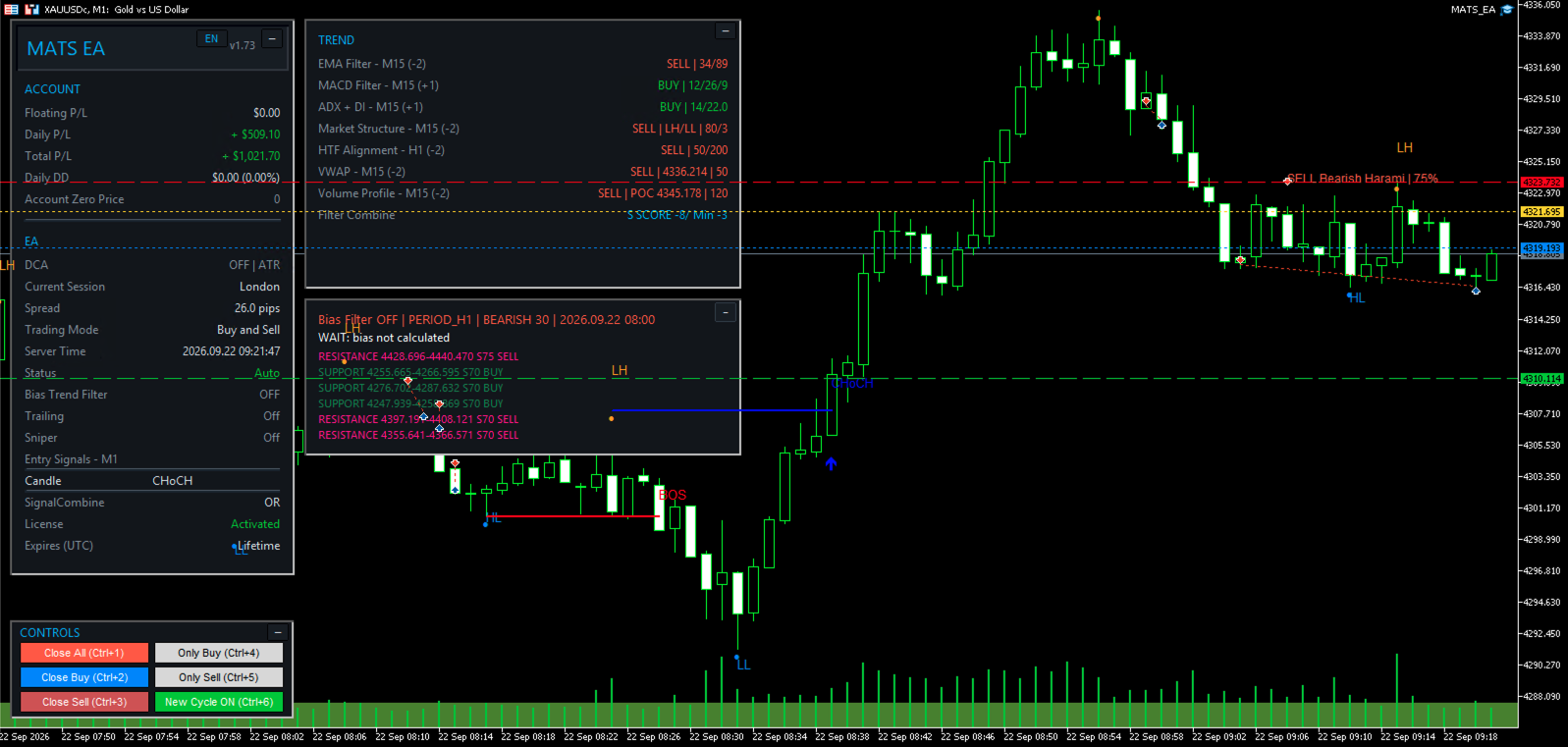
MATS EA on an XAUUSD M1 chart: Account and EA panels on the left, Trend and Bias above, price structure in the center, and Controls at the bottom left. 2 3 4 5 6
User-provided MATS EA interface on MT5. Status and figures reflect the moment of capture and are not a performance promise. On mobile, scroll horizontally to inspect each area. View original image ↗
01

Account & EA status

Monitor floating P/L, daily P/L, total P/L, and drawdown. The EA section below shows DCA, trading session, spread, trading direction, Entry sources, and license status.

02

Trend filters

Compare EMA, MACD, ADX, Market Structure, HTF, VWAP, and Volume Profile. Filter Combine summarizes direction and score; SELL SCORE −8 versus a −3 threshold in this image does not mean an order has been opened.

03

Bias & Key Levels

Displays higher-timeframe context and support/resistance zones with BUY/SELL directions. The image shows “Bias Filter OFF” and “WAIT: bias not calculated”; check the status before interpreting the levels.

04

Market structure

HH/HL and LH/LL label structural highs and lows. BOS indicates a continuation break; CHoCH indicates a change of character. Signal labels and arrows do not guarantee an executed trade.

05

Candlestick signals & scores

“SELL Bearish Harami | 75%” identifies the direction, pattern, and signal score. This is not a win probability; the order must still pass signal combination and trading conditions.

06

Controls on the chart

Close All/Buy/Sell closes trades; Only Buy/Only Sell selects a trading direction. New Cycle enables or disables new chains; when disabled, the EA still manages existing chains and may add DCA trades according to the configuration.

STRATEGY ON YOUR TERMS

One platform.
Different trading rhythms.

Explore the built-in trend parameter profiles.
Or choose NONE to configure each value yourself.

02 / BALANCED

Balance responsiveness.
Keep the trend in focus.

A parameter set between FAST and SAFE, ready for you to build and test your strategy.

TREND STRATEGY PROFILE
Fast / slow EMA
21 / 55
MACD
12 / 26 / 9
ADX · Period / Threshold
14 / 22
Structure · Lookback / Swing
80 / 3
HTF EMA
50 / 200

Presets replace internal parameters; they do not change timeframes or toggle filters automatically. SAFE is a preset name, not a guarantee of safety.

CONTROL IS PART OF THE STRATEGY

Automate execution.
Set your own limits.

Define your limits before trading. MATS EA provides multiple controls to help you manage the system according to your plan.

Position limits

Cap BUY/SELL positions, lot size per order, spread, and the delay between entries.

Daily targets & limits

Daily TP/SL in money or as a percentage of the starting daily balance. Reaching a limit closes managed positions and locks Entry/DCA until the next trading day.

Chain trailing

Move the profit lock relative to chain break-even. Optionally mirror the virtual stop as an SL at the broker.

Time controls

Trading windows, pre-weekend closing, new-cycle restrictions, and remote control through pending orders.

Understand the risks before enabling automation.

DCA, multipliers, and Lot Balance can rapidly increase exposure, margin usage, and drawdown. Management tools do not eliminate the risk of loss. Test in Strategy Tester and on a demo account before using real money.

LEARN MORE

Clarity before
you begin.

Read the full guide
Which platform does MATS EA run on?

MATS EA is an Expert Advisor for MetaTrader 5. Configure automated trading permissions and WebRequest for online licensing as described in the guide. Self-Aware Auto SL/TP requires a hedging account.

Can I customize the strategy?

Yes. Choose Entry sources, AND/OR combination, timeframes, trend filters, and DCA mode. Select Trend Strategy NONE to use the indicator values you enter directly.

Does Self-Aware Trend learn using AI?

No. It is an adaptive SuperTrend reversal signal based on closed candles, with presets selected by EntryTimeframe. Zone Cycle has a separate AI option that requires an API key; on API failure, the Zone filter is removed (fail-open), rather than using stale data to block trades.

Does the EA guarantee profits?

No. Results depend on the market, configuration, and execution conditions. This page describes documented features; the illustrative chart is not a backtest or live performance record.

How should I start testing?

Read the Input Guide, choose a configuration, run Strategy Tester, and then test on demo. Check lot limits, position limits, SL, and daily limits before running the EA. Default values are not suitable for every account.

READY TO EXPLORE MATS EA?

Start with understanding.
Trade with discipline.

Explore each parameter, understand the logic,
and build your own configuration.

Open the MATS EA guide

English documentation · For MetaTrader 5